College streaming buying guide · USA · 2026
IPTV for College Students USA 2026: Dorm Wi-Fi, Shared Screens, Trial and Total Cost
Check current offer and trial ↗
Updated 20 October 2026. A student buying live television for a dorm room has a different set of constraints from a homeowner with a private router and a family television. The campus network may require device registration, the room may have no Ethernet jack, the television may belong to a roommate, and the subscription may need to fit one semester rather than a full year. This guide gives US students a practical framework for choosing an IPTV or live-TV subscription without treating a long channel list as proof of value. It uses BexyTV as a commercial example because its public pages currently advertise a 24-hour trial, a browser player and several plan durations. Those seller statements are starting points to verify, not results of independent performance or rights testing.
Commercial disclosure: This page promotes BexyTV and links to its own website. We have not independently tested its uptime, customer support, content rights, device compatibility or promised channel catalog. Check the present offer, lawful availability of the exact programs you want, payment terms and campus rules before ordering. We checked the provider's public pages on 20 October 2026. The published numbers may change.
Quick answer: what should a student check before buying IPTV?
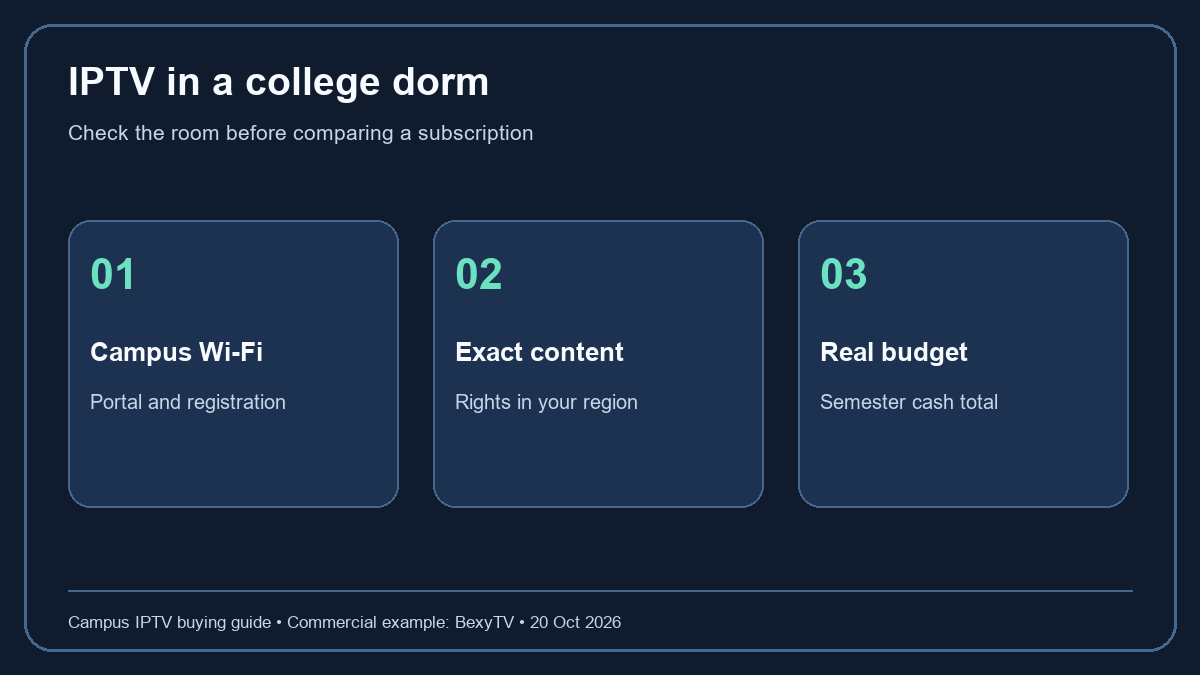
Start with the network, not the advertised number of channels. Ask campus IT whether streaming devices can connect to the dorm network, whether a captive portal or registration form is required, whether a private router or hotspot is permitted, and whether there are bandwidth or device limits. Then list the exact authorized channels or events you need, your primary screen, and the number of simultaneous viewers. Choose a trial only when you can use it on the actual campus network at a normal viewing hour. Compare the amount charged today, the length of service, renewal and cancellation terms, and any player or hardware costs. If rights or campus compatibility remain unclear, an official broadcaster or campus television service may be a better fit.
BexyTV's public pages describe a 24-hour trial and display advertised one-connection plan totals of $15 for one month, $40 for three months, $65 for six months and $100 for twelve months. These are provider-published figures, not an audited bill or guarantee that a particular student can use the service. The checkout is the source for the amount due now. The one-connection label does not necessarily cover two roommates watching different streams at the same time. Ask how the service counts active playback sessions before paying for a shared room. Do not infer a multi-device allowance from the fact that a login works on a phone and a television at separate times.
Dorm IPTV buying checklist: map the real room first
Make a short inventory before browsing any offers. Write down the TV model and software version, any streaming stick or laptop, whether you have an HDMI port, and whether you can use headphones at night. Note the dorm's Wi-Fi network name only in your private notes; never publish a password, device MAC address or student login in a public support thread. Identify where the TV actually sits relative to the access point. A service may work on a laptop near a hallway door and struggle on a television behind furniture. The room layout is a relevant part of the test.
Next, name the viewing pattern. A student who watches a weekly match needs a different plan from one who watches a few films during school breaks. List must-have content, preferred content and content you can skip. For each must-have event, record the authorized broadcaster or distributor in your region. If the provider cannot confirm that the event is lawfully available, stop treating its marketing list as an answer. Even if a channel name appears, particular games can be blacked out or offered by a different rights holder. Rights vary by sport, country, season and event.
Finally, set a maximum cost for one month and for the whole semester. Include the payment today, any separate IPTV player charge, a streaming device, possible taxes, and the cost of an extra connection if another person streams simultaneously. A yearly offer can look cheaper when divided by twelve, but a student leaving campus in May may not get value from months after the academic year. Compare the cash spent for the period you will actually use, and understand whether unused time can be refunded before making a long commitment.
Campus Wi-Fi compatibility: captive portals and device registration
Many dorm networks use a browser sign-in page, often called a captive portal. A laptop or phone can open it easily, while a television or streaming stick may not show the page at all. Some schools provide a separate device-registration portal for consoles and TVs. Ask campus IT for the current instructions rather than copying advice from another university. A provider's statement that it works on a given smart TV does not solve a campus authentication problem. The same device can behave differently on a home network and on a managed network.
Managed networks may isolate devices from each other. That can affect casting from a phone to a television even when both are online. A roommate may also be unable to add a private router because the housing contract forbids it or because it interferes with the shared radio environment. Do not try to evade those rules. Instead, use an approved connection method, such as the school's registered media-device network or an official app on a supported device. If the network arrangement cannot support the chosen player, a subscription purchase will not fix it.
Before starting a short trial, complete device registration and app installation. Otherwise the 24 hours may be consumed by a campus IT ticket. If a service offers a browser player, verify that it works in a supported, updated browser on your own laptop or desktop. BexyTV currently advertises a browser player on its public site; confirm its present sign-in instructions and any restrictions in the provider's help material. A browser option can be useful when a TV is blocked by a captive portal, but it does not guarantee that every channel, event or feature is available on every device.
How to test a 24-hour IPTV trial in a dorm room
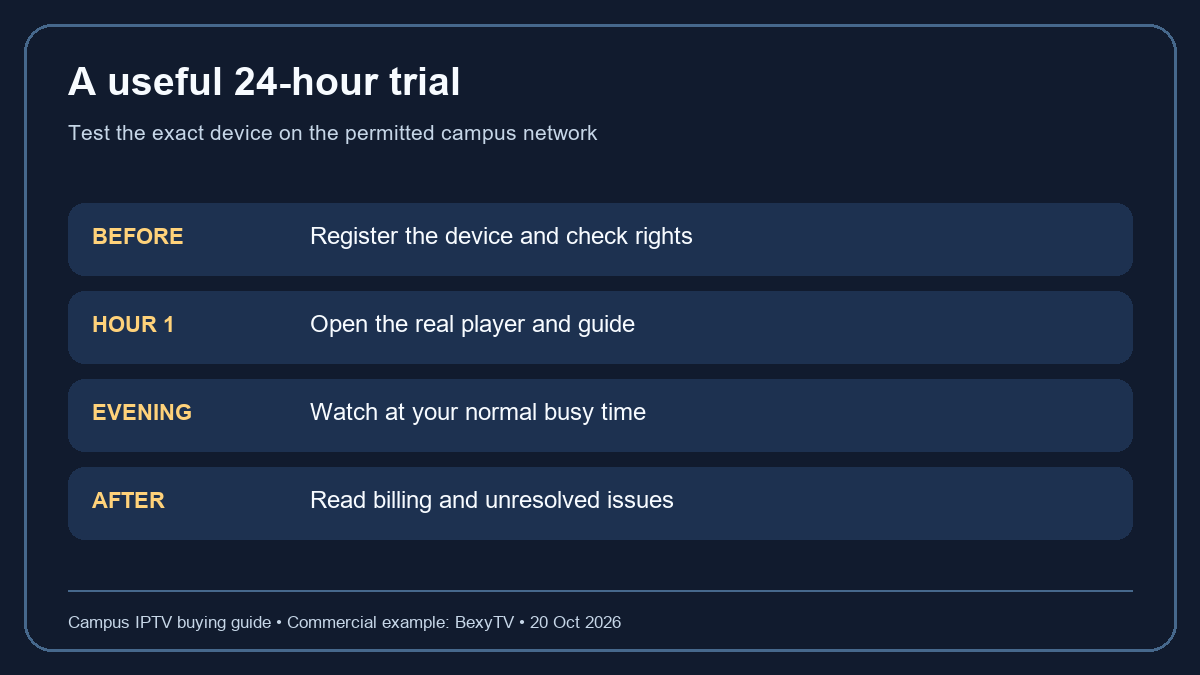
A short trial is a rehearsal for your own setup, not a certificate of future reliability. Make the first hour count. Sign in on the exact device you expect to use. Check whether the guide loads, whether sound works through your actual speakers or headphones, and whether the remote can navigate without excessive delay. Open three programs that matter to you if they are lawfully available during the trial. Record the time, device, connection and result. If a required game occurs outside the trial window, mark it untested rather than pretending a different program proves the game will be present later.
Return during the evening, when the dorm and the wider network may be busier. Start a stream for a meaningful period, switch once or twice, and note whether the app resumes as expected. Do not claim a precise uptime percentage from one evening. The useful evidence is narrower: your device and campus network either completed the tasks you need in that moment or they did not. If there is buffering, try one controlled change at a time: a different approved campus network, moving the laptop closer to a permitted access point, or updating the app. Keep those observations separate from provider claims.
Test sign-out and support before committing. Can you find the help page, cancellation information and billing conditions without contacting a stranger on a messaging app? If the service says it supports multiple devices, check whether it means account registrations or simultaneous playback. If a roommate will share the cost, do not use one connection for two concurrent streams unless the terms allow it. A trial can reveal obvious setup friction. It cannot prove authorized content rights, future event availability, or that every campus connection will behave the same way.
Sports IPTV in the USA: verify the exact event and rights
The phrase “sports IPTV” describes a delivery route, not an authorization to distribute a match. A large logo grid can include channels whose rights differ by region or schedule. To make a useful decision, choose an event you care about and identify the official league, team, network or rights-holder schedule. Confirm the event's distributor for your location and date. Ask any prospective provider to explain how its offering relates to that authorized distribution. If the answer is unclear, choose an authorized source whose coverage is documented.
Blackout rules can also matter. A local game may have different availability from a national game. A service might offer highlights, replays and live broadcasts under separate rights. Do not write “includes every game” in a buying note based on a category page. Record the competition, teams, start time, time zone and whether you need live or delayed access. This makes a provider response specific enough to be useful and helps you compare licensed alternatives. It also stops an unrelated trial channel from being mistaken for proof of the event you need.
Students sometimes watch from two states in one semester: campus during term and home during a break. Regional rights can change when the location changes. A service usable in one place may not have the same catalog in another, even when the login is valid. Do not treat a VPN or region-spoofing workaround as a buying requirement. Read the provider's current geographical terms and the broadcaster's official rules. If your schedule involves travel, ask about that before paying for a long plan.
IPTV subscription cost for one semester versus a full year
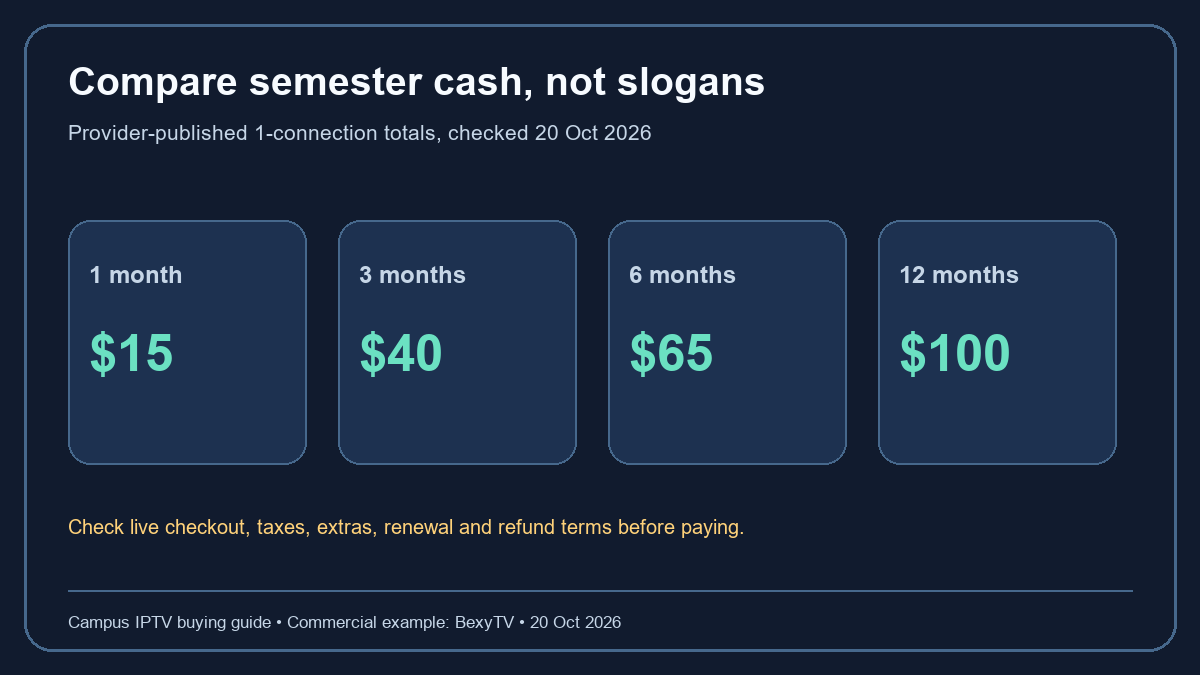
Compare plans using total cash and intended usage, not only a monthly-equivalent headline. The public BexyTV page currently lists $15 for one month, $40 for three months, $65 for six months and $100 for twelve months for a one-connection plan. Those are the provider's published prices as checked on 20 October 2026. Taxes, payment fees, extras, promotional conditions and refund rules can change the final total. Use the live checkout and terms for the decision. Do not rely on this dated snapshot as a price promise.
For a fifteen-week semester, a three-month term may end before final exams; a six-month term may cover summer weeks you do not use. Buying four separate one-month periods at the published headline price would be $60 before extras, but the actual need may be three or five months depending on dates. The arithmetic alone does not tell you which offer is best, because the coverage periods, renewal rules and eligibility may differ. Write the start and end dates on a calendar, then calculate the total for the months you actually plan to watch. If you might leave campus early, favor flexibility unless the terms clearly justify a longer commitment.
Add the rest of the setup. A streaming stick, paid player, extra screen, new HDMI cable or data plan can exceed the first subscription payment. If a roommate pays half, decide in advance who owns the account and what happens when one person moves out. Do not share payment credentials. Read whether the service permits shared access and how many simultaneous streams each plan includes. A low advertised rate is not low if the plan fails the room's screen requirement or requires an unexpected add-on at checkout.
One connection, two roommates: what the plan must explain
The term “connection” is often used for active streams, but implementations vary. A service may permit installation on many devices while allowing only one playback session at a time. Another may count registered devices or concurrent logins differently. A student should not infer the answer from a pricing card alone. Ask the seller for the exact rule: how many streams can play simultaneously, whether switching devices triggers a cooldown, and whether both viewers must be in the same household or network.
If two roommates watch the same program on one television, one active stream may be enough, subject to the service's terms. If one watches a match on a laptop while the other watches a film on a TV, a second simultaneous stream may be required. A third device used only for setup is not necessarily a third active stream. Explain your real use case to support before paying. Test the permitted scenario during a trial when possible, and avoid deliberately breaching connection limits.
Account control matters in a shared room. Decide whose email receives renewal notices, who can cancel, and whether a change of roommates requires a new plan. Never post login details in a shared chat that may outlive the semester. If a service does not provide clear account-management or recovery instructions, count that as a risk, not merely a small inconvenience. Privacy and billing control are part of the subscription value.
Browser player, smart TV app or streaming stick?
A browser player can be convenient for a student whose laptop already works on campus Wi-Fi. Check which browsers and operating-system versions are supported, whether captions and full-screen mode work, and whether your laptop can connect to the room's television if you plan to use a larger screen. An HDMI cable may be simpler than casting on a network that isolates devices. Check the laptop's power settings so a closing lid does not stop playback. Use only official or provider-confirmed sign-in pages.
A smart TV app can reduce cables, but a dorm television may be old, shared, or locked down. Verify the exact model and app availability. An IPTV player app may only display streams supplied by a separate service; installing the player does not include a lawful content subscription. A streaming stick can be portable between campus and home, but it must be allowed by the housing network and be compatible with the TV's ports and the provider's approved setup. If a provider advertises broad device support, ask for a setup guide for your precise model instead of assuming every variant is covered.
The cheapest route is often the device you already own, provided it meets the content, rights and usability requirements. Do not purchase hardware merely because a generic “best IPTV” list recommends it. Run a trial on the current device, note what is missing, and buy an accessory only if it solves a demonstrated problem. This order protects a student budget and makes troubleshooting easier.
Bandwidth, data caps and buffering: separate the causes
Playback problems can originate in several places: campus congestion, Wi-Fi signal, device performance, the player, the content source or the provider's network. A single spinning icon cannot identify the cause. If the school offers a network status page, check it. Compare the same legally available video on the same device and connection. If all services struggle at the same time, investigate the network or device first. If one app alone has trouble, check its support guidance and status information. Do not state that a provider is “fast” or “slow” based on an isolated moment.
Data caps are especially important when using a personal hotspot. The amount consumed depends on resolution, compression and viewing time, so use the carrier's meter rather than a universal claim. A service advertised as 4K can use more data than a student expects; the device or event may also lack a 4K option. Check whether quality can be adjusted in the player and whether the mobile plan permits tethering. A lower, stable picture can be more useful for a live match than a high-resolution option that exhausts the allowance before the final whistle.
Wi-Fi signal is not the same thing as internet capacity. Moving a laptop nearer an access point may improve local radio conditions but cannot fix a congested upstream connection. Likewise, a private router may be forbidden in a dorm and can create interference. Use campus-approved troubleshooting steps. Document the time, device and network when asking IT or provider support for help, without sharing passwords or private account data in public.
Payment, renewal and cancellation questions to ask
Before entering card details, locate the terms for when service starts, whether a trial automatically converts, what amount is charged, and when renewal occurs. A 24-hour free trial may require no card or it may follow a different enrollment flow; check the present offer rather than assuming. Record the order page and confirmation email. The final checkout total and terms should govern, not a screenshot in an article. If the displayed terms conflict with the marketing page, pause and ask for clarification before paying.
Refund and cancellation terms matter more for students whose schedule changes. Ask whether unused time is refundable, how to cancel, whether cancellation stops future billing immediately or at the end of the paid period, and how to confirm the request was received. Keep an email receipt or account confirmation. A plan that ends after finals may be preferable to one with a slightly lower monthly equivalent but an unclear annual renewal. Never assume that deleting a player app cancels a subscription.
Choose a payment method with clear records and dispute procedures. Avoid sending card information, student IDs or passwords through social media or a public comment. The provider's official domain should be the path to the order page. If a checkout redirects unexpectedly, check the destination and business terms before proceeding. This advice applies to any IPTV or live-TV provider, including the example linked here.
Compare authorized alternatives before deciding
An IPTV offer is one option among several. A campus may include a licensed television service in housing fees. A league may have its own app, or an official broadcaster may sell a student-eligible package. Some programs are available through free, ad-supported legal services, while others require a paid sports bundle. Compare the exact events and channels you need, device support, regional restrictions and total cost on the same date. Do not rank services by an unsourced channel-count claim.
The best option can be a combination: a legal free service for casual viewing plus a short official subscription during a sports season. A student who needs only one league should not buy a broad annual package without checking that league's authorized route. Conversely, a room that watches many different categories may value a broader plan if its rights and terms are clear. The answer depends on the student's actual watch list and budget.
When comparing BexyTV with alternatives, label its website claims as seller claims. We have not performed a controlled head-to-head test or verified rights to any competition. Ask every provider the same questions and keep the responses. Consistent questions make the comparison fairer than a star rating created from marketing copy.
A seven-step decision worksheet for campus viewers
Step one: list three must-have programs or events and find their official rights information for your current region. Step two: name the exact device and campus network, then confirm the school allows it. Step three: write how many screens will play simultaneously. Step four: calculate the cash due for the semester, including hardware, player, tax and renewal. Step five: collect the provider's current trial and cancellation terms. Step six: run the trial at a normal viewing time and record only what you actually observed. Step seven: decide whether the evidence supports a short plan, a longer plan, an authorized alternative or no purchase yet.
For each step, mark “confirmed,” “provider says,” or “unknown.” This small classification prevents a seller's promise from being recast as a personal test. If the campus network rule is unknown, ask IT. If a rights answer is unknown, ask the broadcaster or provider. If renewal is unknown, inspect the checkout or terms. A missing answer on a must-have item should stop the purchase until it is resolved. That pause is a sensible consumer decision, not a failure to find the “best” subscription.
Keep the worksheet after you subscribe. It helps if the device changes, the next sports season uses a different broadcaster, or the roommate arrangement changes. Recheck prices and rights at renewal. A guide published in October 2026 cannot guarantee the same terms in a future semester.
Frequently asked questions about IPTV in college dorms
Can a smart TV join campus Wi-Fi? Maybe. It depends on the school's authentication and device-registration process and the TV's own network controls. Ask campus IT for its current supported method before buying a subscription or additional hardware.
Does a browser player solve every campus network problem? No. It may help on a laptop that can complete a captive portal, but playback can still be affected by campus policy, browser compatibility, rights, data limits or service availability. Confirm BexyTV's current browser-player requirements if considering that route.
Is one connection enough for two roommates? It may be enough when both watch the same television together. It may be insufficient for two simultaneous streams on separate devices. Ask the provider for its precise connection rule and test only permitted use.
Should I buy a year because the monthly equivalent is lower? Not automatically. Compare the total paid with the weeks you will actually use, renewal and refund terms, and the possibility that content rights or your room setup may change. The lowest monthly-equivalent figure can still be the wrong total purchase.
Will a 24-hour trial prove every sports game works? No. It can test your device, sign-in path and the content available during those hours. It cannot verify a future event outside the window, all regional rights or a season of network performance.
Is IPTV legal? IPTV is a method of internet delivery. Whether a particular program can be distributed depends on rights, licensing and local rules. Check the specific content and provider rather than assuming legality from technology or a working stream.
Final decision: choose evidence over a channel-count headline
For a college student, the right subscription is the one whose authorized content, campus connection, device support, simultaneous-stream allowance and total cost match real needs. A trial is useful when it is timed around your normal viewing and recorded honestly. A published plan card helps you compare possible spending, but only the current checkout and terms tell you what you will pay. If a required right, network rule or renewal condition remains unclear, choose an official alternative or wait for an answer rather than extending a commitment on guesswork.
To examine the commercial example in this guide, read BexyTV's current service and 24-hour trial information and check the live plan and billing details on its official site. This page is promotional and does not claim an independent test, a universal ranking or guaranteed access to a particular event. The most useful result is an informed, lawful decision for your own dorm room.